Sign in with a work account
Once an organization has connected its Microsoft 365, the people Empeiro synced from it can sign in with their Microsoft 365 account instead of an Empeiro password: on the sign-in page, Use your work account (Microsoft 365), then their work email. They land in their organization's help desk, as a requester or an agent, as their administrator decided.
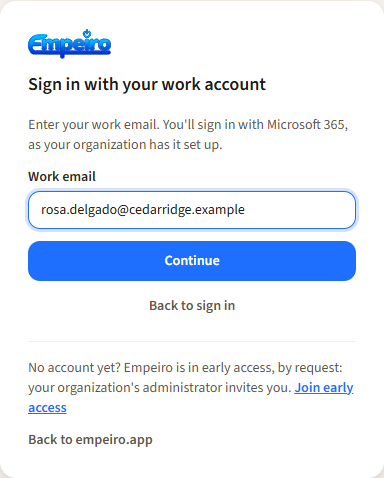
Use your work account, then the work email.
How it works
Empeiro finds the organization from the email's domain and sends the browser to that organization's own Microsoft 365, with that organization's own app registration. The token that comes back is checked against the tenant's signing keys, the organization's registration (its Application (client) ID) and the sign-in's own nonce; the person is the directory entry with that Microsoft account's object ID, never whoever an email address names. Two-factor for these accounts is Microsoft's, set up in your Microsoft 365.
Who can sign in follows Who can sign in beside the sync: while it is "only these people", anyone not listed is told so in plain words and nothing is made for them. See Connecting Microsoft 365.
One step in the app registration
Open the organization's Empeiro app registration in the Entra admin center (the one from Connecting Microsoft 365):
- Authentication → Add Redirect URI (on the older screen: Add a platform) → Web. Redirect URI:
https://empeiro.app/api/auth/microsoft/callback(Empeiro shows it with a Copy button beside the sync settings). Configure, then Save if a bar appears. Without it Microsoft refuses the sign-in with AADSTS500113: No reply address is registered. - Nothing else. Sign-in uses the
openid,profileandemailscopes, which every registration has, and the client secret already saved in Empeiro. If you granted admin consent for User.Read (step 6 of connecting), people see no consent prompt; otherwise each sees a one-time "permissions requested" screen listing only sign-in and profile.
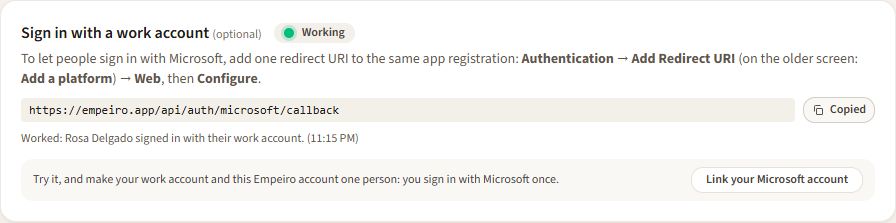
The redirect URI and its own light: green once someone signed in this way.
Your own account and your work account
An administrator, and anyone invited by name, has an Empeiro account with a password and passkeys. When the organization connects Microsoft 365, the same person is also in the directory. Link your Microsoft account makes the two one person: on Your account (or beside the sync, for administrators), sign in with Microsoft once. From then on either way in opens the same account, with the same tickets. Linking is also the quickest way to check the redirect URI works: the light beside it turns green.
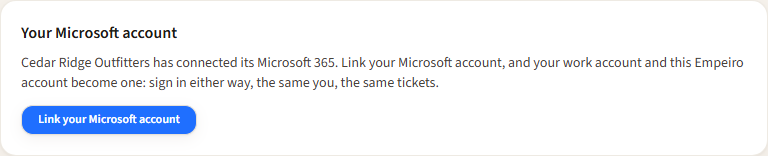
Link your Microsoft account, on Your account.
Messages
| Message | Meaning | What to do |
|---|---|---|
| No organization on Empeiro uses that email domain. | No connected directory has people with that domain. | Connect and sync the directory first; or sign in with your email and password. |
| … is trying Empeiro with a few people first, and you're not on the list yet. | The organization is in pilot mode and this person isn't listed. | An administrator ticks Can sign in beside them, or chooses Everyone in the directory. |
| You signed in, but you're not in the directory Empeiro syncs yet. | The account exists in Microsoft 365 but wasn't synced (new, or left out). | Wait for the hourly sync or press Sync now; check it isn't under accounts left out. |
| Microsoft's sign-in token couldn't be verified. | The token isn't for this organization's registration, or the signing keys couldn't be fetched. | Check the redirect URI was added to the same registration whose client ID is saved. |
| Microsoft's sign-in token isn't for this organization. | The token belongs to another sign-in or another tenant. | Start again from the sign-in page. |
| Microsoft refused the sign-in: AADSTS65001… | Nobody consented to the sign-in permissions. | Click Grant admin consent on the registration's API permissions, or accept the one-time prompt. |
| That sign-in took too long or was already used. | More than 10 minutes passed, or the browser went back. | Start again from the sign-in page. |
| That Microsoft account is already linked to … in … | Another Empeiro account in the organization linked it. | One Microsoft account, one Empeiro account; an administrator sorts out which. |
| AADSTS500113: No reply address is registered (on Microsoft's page) | The redirect URI wasn't added. | Add it as in step 1 above. |